Matching Imported Transactions
Matching joins a downloaded bank transaction to one you already recorded, so the purchase you entered at the till and the purchase your bank later reports end up as one transaction rather than two.
Suggested matches
When Budget Thing finds a likely candidate, the downloaded transaction shows a link under its description. Matches followed by the payee and date means a suggestion you can take. A high-confidence match is selected for you: the link then reads Will match, and the category column shows Match and the transaction it will join. Approving the item joins the two. Select the link to match straight away.
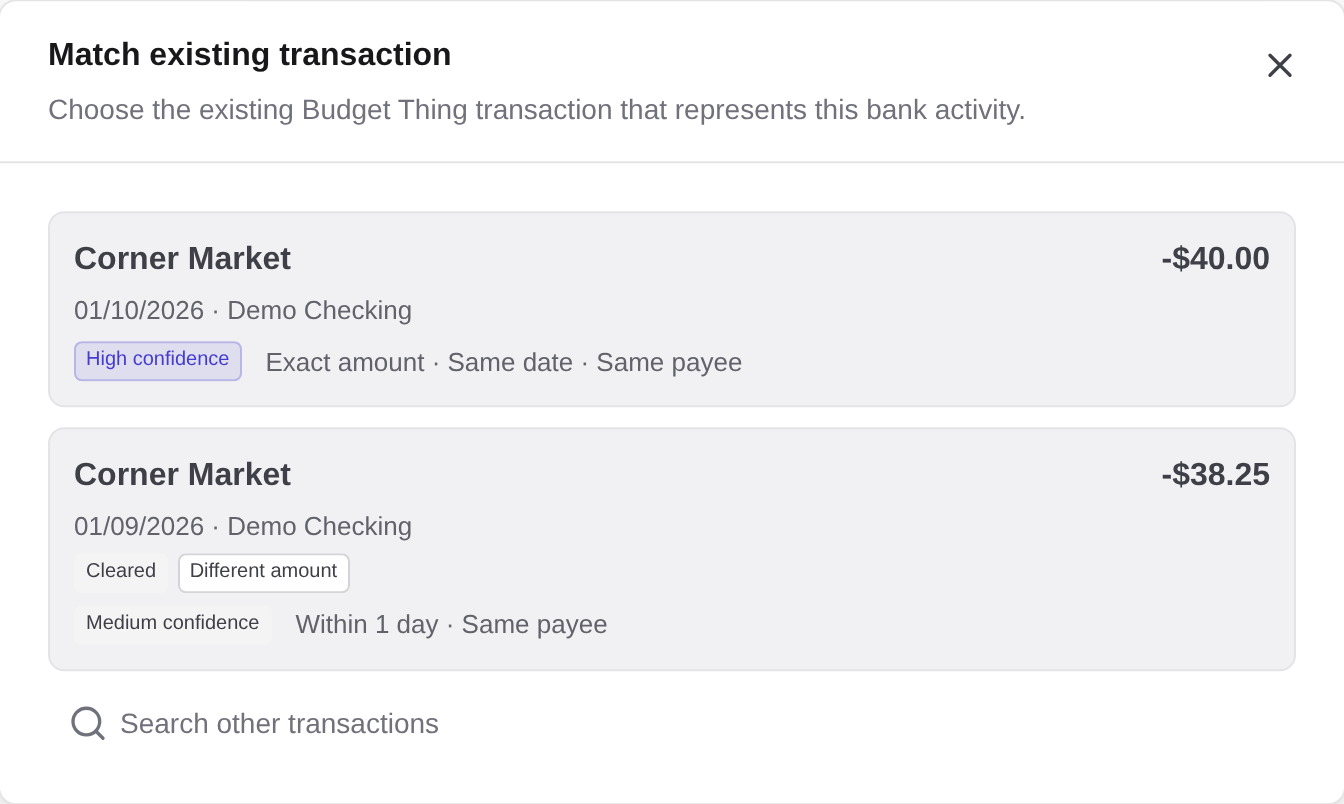
To compare candidates before deciding, open the item's actions and choose Match existing transaction…. Each candidate shows High confidence or Medium confidence and why Budget Thing thinks so, using reasons such as Exact amount, Same date, Within 1 day, Nearby date, Same payee, Similar payee, Similar memo, Same account and Opposite direction.
Payee names are compared after removing card-processor prefixes, store numbers and reference codes. One name contained in the other counts as a similar payee only when it matches whole words, so a short name such as "Mars" is not treated as a match for "Marshalls". Names that are close in spelling can still be scored as similar.
Candidates are also flagged when they are already Cleared or Reconciled, when they are a Transfer or a Payment, and when the amount is different (Different amount). Choose a candidate to match it.
Matching by hand
If nothing is suggested, or the suggestion is wrong, choose Match existing transaction and pick the transaction that represents this bank activity. Use Search other transactions to look beyond the loaded account history — an older transaction may simply not be in the list yet.
When the amounts differ
If the transaction you recorded does not match the bank's amount, Budget Thing asks before joining them. It shows the Difference and tells you that the existing transaction will be changed to the bank's amount. Choose Match and update to go ahead.
This is usually what you want: a tip added at a restaurant, or a fuel authorization that settled at a different figure. The bank's amount is the one that actually left your account.
A large unexplained difference usually means you are about to match the wrong two transactions. Cancel and look again rather than letting the amount be rewritten.
Matching a split
A split transaction can be matched, as long as its lines already add up to the amount the bank reports.
If the totals differ, Budget Thing refuses the match and tells you the split cannot be updated automatically, because it has no safe way to decide which line should absorb the difference. Edit the split amounts yourself so they total the bank's figure, then match again.
Transfers and payments
When both sides of a transfer, or a card payment, arrive from two different banks, the answer is confirming a transfer rather than matching two ordinary transactions. See Transfers and Card Payments in Bank Sync.