Transfers and Card Payments in Bank Sync
Money you move between your own accounts is reported by both banks. If you accept both copies as ordinary transactions, you have counted the same event twice. This article is about not doing that.
Resolve the first side as a transfer
When a downloaded item is money moving to another account you own, do not categorize it. Use Transfer to account…, choose the destination under Transfer to, and choose Confirm transfer.
For a credit card, the equivalent is Payment to account… and Confirm payment.
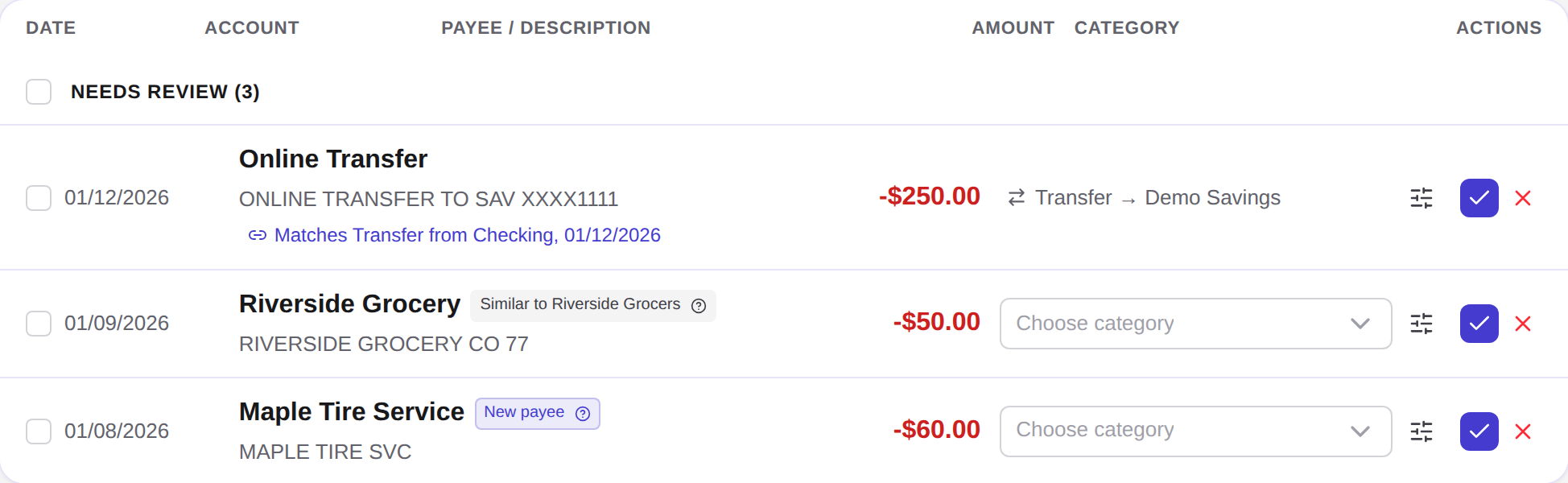
Budget Thing often spots these itself. When it is confident, the item arrives with the category column already set to Transfer → or Payment → and the other account, and a Matches line points to the other bank's copy of the same money. Check the account and approve the item. That is faster than building the transfer by hand.
A transfer is a single transaction with a source and a destination — not two linked records. That is why one action settles both accounts.
Then match the second side
The other bank reports the same movement in the opposite direction, so a second downloaded transaction appears on the destination account's page.
Match it. Budget Thing offers the transfer you already recorded as a candidate, with the reason Opposite direction, because it sits on a different account and carries the opposite amount. Matching links that side to the existing transfer instead of adding a second transaction.
Accepting the second side as a new transaction is what creates a duplicate and throws both account balances out. Match it, or reject it — never accept it.
A transfer side that has already been linked is not offered again, so you cannot match the same side twice.
Card payments
Paying a credit card is the same pattern: the payment leaves your checking account and lands on the card, and both banks report it.
The payment is not new spending — the spending happened when you used the card. A payment into a credit card from a bank, cash, asset or investment account is automatically recorded against the card's own payment category, which is exactly why it does not show up as a second expense. See Make a Card Payment.
Downloaded transfers follow the same category rules as any other transfer. A payment to a credit card does not ask for a category: choose Payment to account…, pick the card and confirm. A loan payment, or debt moving between a card and a loan, asks you to choose a category before you confirm. A transfer between two cards or two loans does not ask for one.
Clearing and reconciling each side
The two sides of a transfer clear and reconcile independently, because the two banks confirm them on their own schedules. Reconciling your checking account does not lock the card side, and vice versa.
If a duplicate already exists
Delete the surplus transaction rather than trying to repair it, then match the downloaded item to the one you kept. See Duplicate Transactions.