Make a Card Payment
Paying a credit card moves money you already have from one of your accounts to the card. It is a transfer, not an expense.
Recording the payment
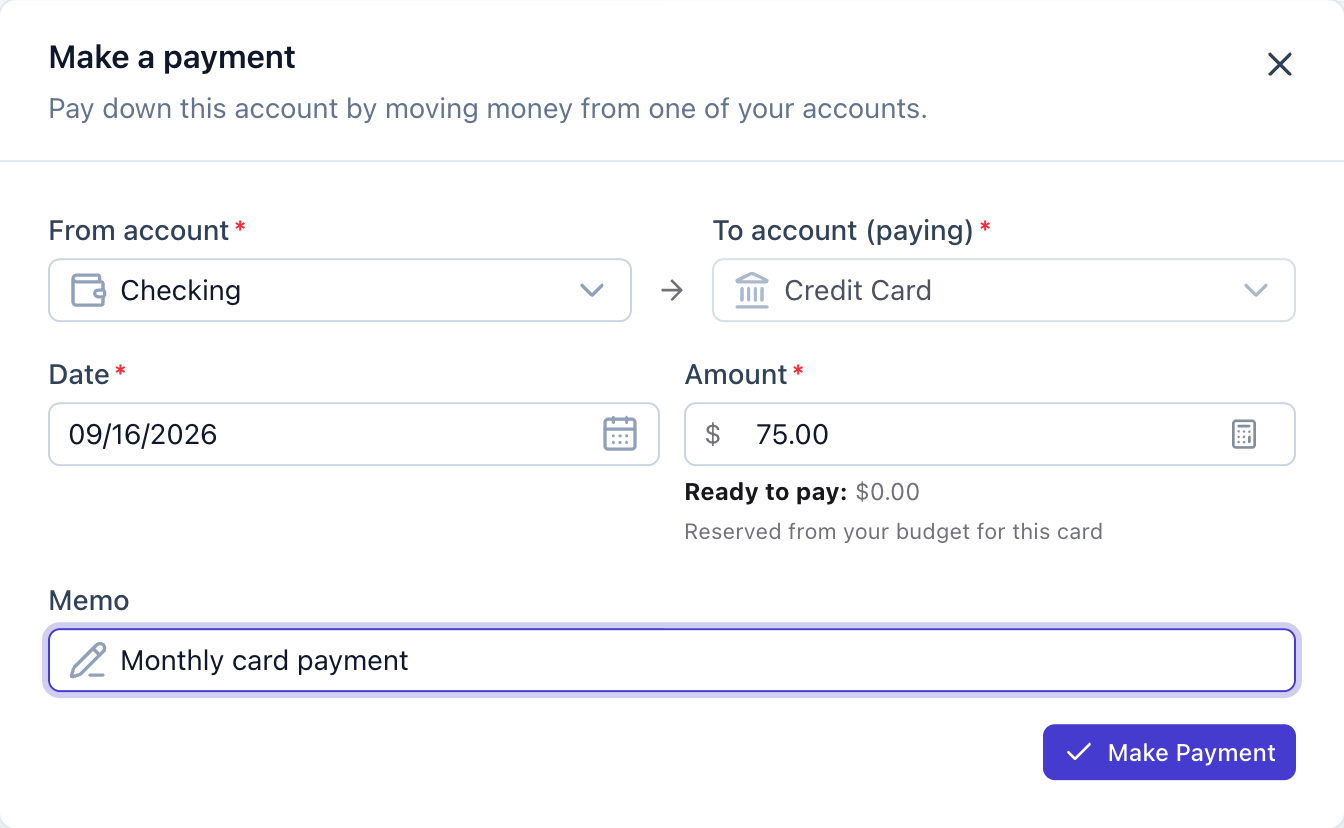
Use Make Payment on the card account. The app describes it as "Pay down this account by moving money from one of your accounts", and asks for:
- the account you are paying from,
- the amount, and
- the date.
The card's own payment category is filled in automatically when you pay from a Checking, Savings, Cash, Digital Wallet, Asset or Investment account, which is why the payment reduces the reservation instead of creating new spending. The dialog is titled Make a payment for these.
If you pick another credit card or a liability as the from account, it is no longer a payment, and the dialog becomes Transfer between accounts:
- From another credit card — a balance transfer. It takes no category, and the Category field is not shown. Any Ready to pay the paid-down card no longer needs moves to the other card with the debt; see Moving a balance between two cards.
- From a liability — moving debt from a loan onto the card. You choose the category yourself; the card's payment category is not filled in.
See Transfers for every combination.
Extra payment or count toward a bill
If the card is managed in the Debt Center and its bill is already paid for the month, the dialog asks whether the payment should Count toward the (date) bill or be an Extra payment that lowers the balance without changing upcoming bills. See Make an Extra Payment.
How much to pay
The card account shows Ready to pay: the money your budget has already set aside for this card.
- Paying the statement balance is the usual choice. If Ready to pay covers it, the money is there.
- Paying less than Ready to pay leaves the remainder reserved for next time. Nothing is lost.
- Paying more than Ready to pay is fine too, but the extra is not backed by a category yet — that is paying down existing debt, and it should be funded like any other goal. See Make an Extra Payment.
What changes
| Effect | |
|---|---|
| The paying account | Balance decreases by the payment. |
| The card | Balance moves towards zero. |
| Ready to pay | Decreases by the payment. |
| Spending categories | Unchanged. The spending already happened. |
| Spending reports | Unaffected. Transfers are excluded. |
Choosing an ordinary spending category for a card payment counts the same money twice: once when you used the card and again when you paid it. If a report looks too high, this is the first thing to check — see My Credit Card Payment Looks Wrong.
If the payment arrives from your bank
When both accounts are connected, the payment can be imported twice — once from the paying bank and once from the card. Match the second one rather than accepting it. See Transfers and Card Payments in Bank Sync.