Import from Actual Budget
Budget Thing can read an Actual Budget export and rebuild it as accounts, categories, payees, transactions, transfers, splits and monthly budget assignments in your workspace.
Open Import data from your workspace's Settings → Data tab (or go to
/workspaces/<id>/imports), choose Actual Budget in the source list and
upload the export ZIP. The importer is also available through the import API (import type
actual).
1. Export from Actual
In Actual, open the budget menu and choose Export. The download is a ZIP
containing two files, db.sqlite and metadata.json.
Upload the ZIP as Actual produced it. A ZIP of the budget folder made by hand also works, as long as both files are at the top level or inside a single folder. Nothing else in the archive is read.
The file is treated as untrusted input. It is opened read-only, is never executed or modified, and is rejected if it is larger than expected, malformed, or not an Actual budget. A rejected file leaves your workspace unchanged.
2. Confirm the currency
Actual's export does not record a currency, so you confirm it. The currency must be your workspace's base currency; if it differs, the import is refused.
Actual always stores amounts as whole hundredths of a unit, whatever the
currency: 12345 is 123.45 in US dollars, euros or Japanese yen alike. The
currency's own number of decimal places only changes how Actual displays it.
Budget Thing reads every amount the same way, so there is no setting to choose,
and a yen budget exported as 100000 imports as ¥1,000.
Amounts are converted exactly. If an amount could not be represented exactly in Budget Thing, the import stops with an error. Nothing is ever rounded. The review step also shows a few raw amounts from your file, so you can check them against Actual before importing.
3. Review accounts
After the upload, the review step shows the budget's name, how many accounts, transactions, categories and payees were found, whether it is an envelope or tracking budget, and any warnings already detected in the file. Tick the currency confirmation (the workspace's base currency is shown) to enable Start import.
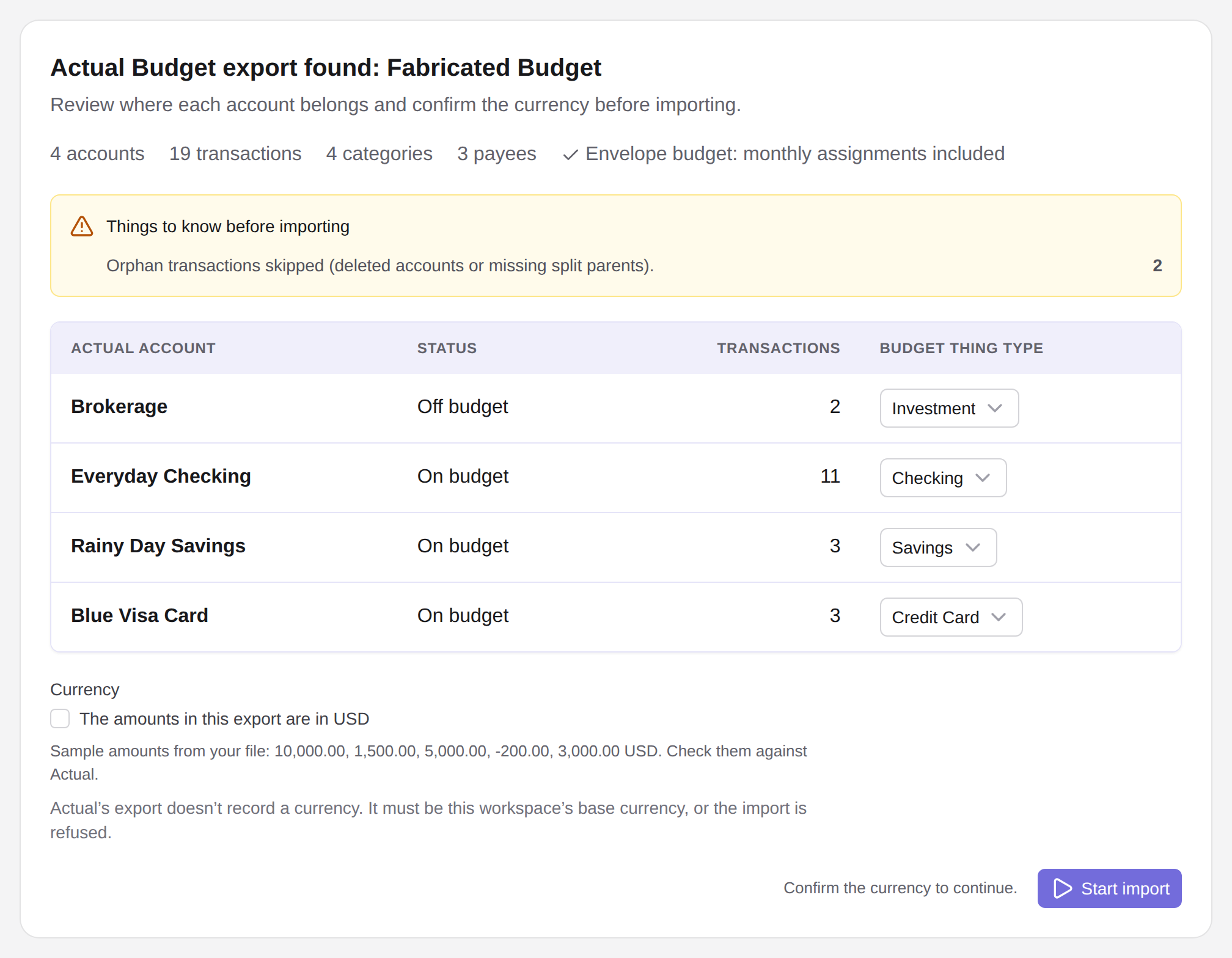
Each account is offered with a suggested account type, chosen the same way as for YNAB imports. Accounts you mark off budget in Actual default to the Asset type when nothing more specific matches. Every account needs a type before you can continue, and you can change any suggestion.
What is imported
| In Actual | In Budget Thing |
|---|---|
| Accounts | Accounts, with the type you chose. Closed accounts are imported open, because the closed status is not carried across; close them again afterwards if you want them closed |
| Category groups and categories | Category groups and categories, in Actual's order |
| Income categories | Not created; income lands in To Be Budgeted |
| Payees | Payees; payees you merged in Actual are imported once, under the surviving name. Names that differ only by case, punctuation, a card-processor prefix, a store number or a trailing city and state (for example "Corner Cafe 12" and "SQ *CORNER CAFE #45 AUSTIN TX") are combined into one payee, using the same matching as bank sync. Generic names such as "Payment" and "PAYMENT THANK YOU" stay separate |
| Transactions | Transactions with date, amount, payee, category, notes |
| Starting balances | Ordinary transactions in To Be Budgeted, so account history stays intact |
| Transfers between accounts | One transfer per pair |
| Split transactions | One split transaction; its lines are the split's categories |
| Cleared and reconciled | Cleared and reconciled; reconciled periods are rebuilt as reconciliations |
| Monthly budget assignments | Category assignments, month by month |
Anything you deleted in Actual stays deleted, and categories you merged resolve to the category they were merged into.
What is not imported
- Rules, schedules and goal templates. Create them again in Budget Thing. See Transaction rules and Recurring bills.
- Tracking budgets. Only Actual's envelope budgets have their monthly assignments imported. For a tracking budget the transactions import but the budget amounts do not, and the summary says so. This includes a budget that was an envelope budget before you switched it to tracking: its old envelope amounts are ignored.
- Hidden flags, bank-sync links and account order.
- Carry-over and hold for next month. See below.
Carry-over and hold for next month
Assignments are imported as the amounts you set each month. Two Actual settings change balances beyond that, and neither is carried across:
- Carry-over on a category keeps an overspent category's negative balance into the next month instead of taking it from To Be Budgeted. Without it, Budget Thing treats the overspending the usual way, so the category's current balance and To Be Budgeted can differ from Actual's. The summary counts the categories that had carry-over turned on.
- Hold for next month moves money out of one month's To Be Budgeted into the next. It only changes which month that money shows in, not the total. The summary counts the months with money held.
Compare your category balances and To Be Budgeted with Actual after the import.
Warnings
The review step and the result screen list anything that was adjusted or skipped, with a count for each:
| Warning | Meaning |
|---|---|
| Tracking budget skipped | The file is a tracking budget; its budget amounts were not imported. |
| Orphan transactions skipped | Rows belonging to deleted accounts, or split lines whose parent is missing. Actual does not show them either. |
| Unpaired transfers | A transfer whose other half was deleted is imported as an ordinary transaction, so the account balance still matches. |
| Split total mismatch | A split's lines did not add up to its total. The lines are used, which is what Actual's balances use. |
| Zero-amount rows skipped | Rows with an amount of zero. |
| Unresolved categories | A row pointed at a deleted category with no merge target; it is imported uncategorized. |
| Budget rows for unknown categories | Budget amounts on income or deleted categories, which have nowhere to go. |
| Duplicate names renamed | Two accounts, groups or categories shared a name. The later one gets a number, such as Checking (2). |
| Transfer categories dropped | A transfer between two asset-type accounts carried a category in Actual. Budget Thing keeps no category there, so that category's spending is not reduced. For example, a categorized transfer from an on-budget checking account to an Actual off-budget account that you mapped to Asset will not show against the category. |
| Carry-over not imported | Categories that had carry-over turned on in Actual. See Carry-over and hold for next month. |
| Hold for next month not imported | Months in which money was held for next month in Actual. |
Before you start
The import needs a workspace with no transactions, exactly like the YNAB import, and it is applied all at once: if anything fails, nothing is written. Read Before and After an Import first, and check your account balances against Actual once it has finished.