Referrals
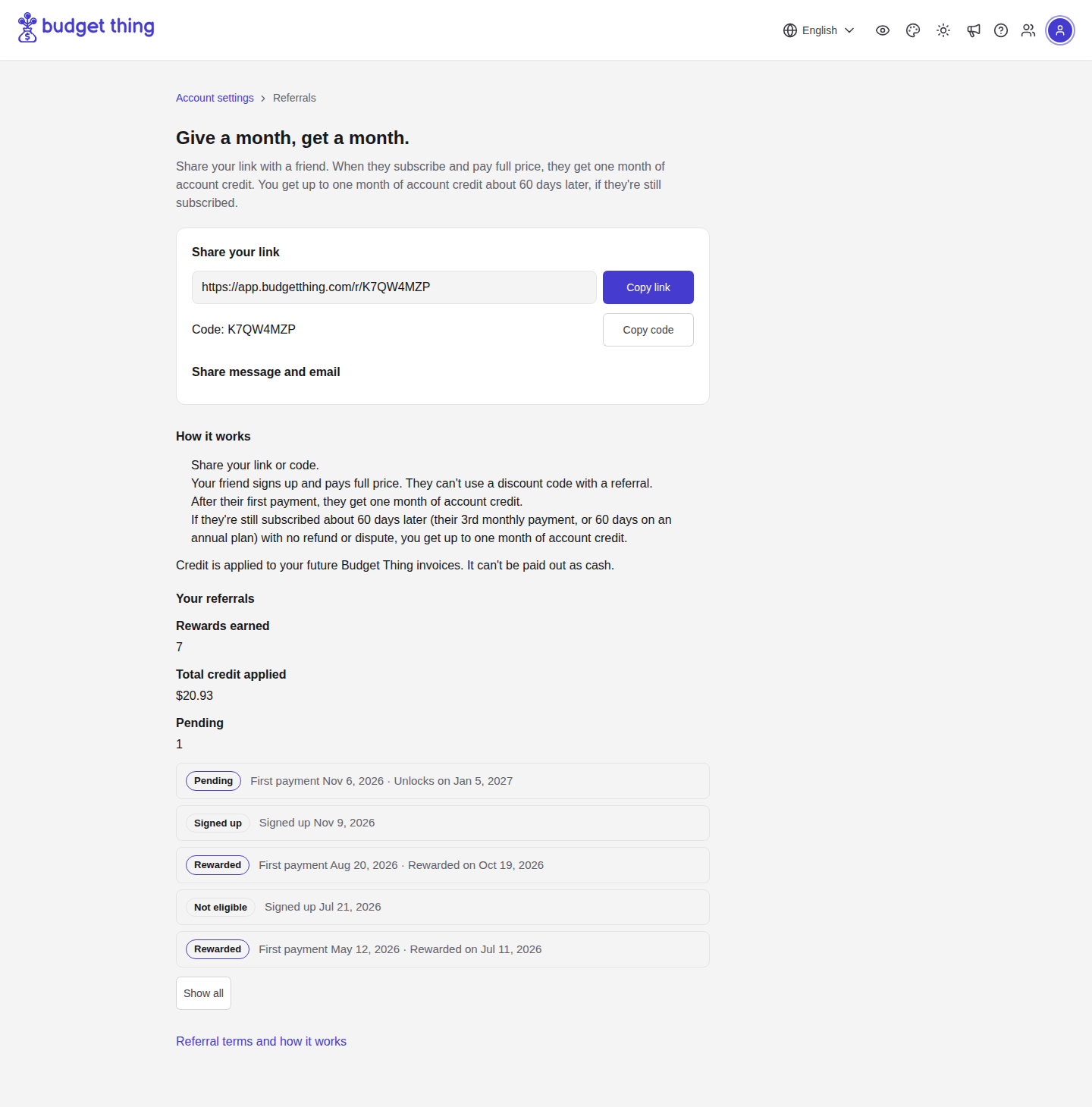
Give a month, get a month. Share your referral link with a friend. When they subscribe and pay full price, they get one month of account credit. About 60 days after their first payment, you get up to one month of account credit too.
Account credit pays toward your future Budget Thing invoices. It can't be paid out as cash or moved to another account.
The full rules are in the referral program terms.
How it works
- You share your link or code.
- Your friend creates a Budget Thing account with it and subscribes to a paid plan at full price, with no discount code. Everything below is timed from their first payment, not from when they signed up for a plan.
- Right after their first payment, your friend gets one month of account credit.
- After a hold of about 60 days, you get your credit, as long as your friend is still subscribed and hasn't had a refund or disputed a payment.
Share your link
You get a referral link if you pay for an active Budget Thing subscription. Only the person who pays for the subscription gets one. A household member who doesn't pay doesn't. If you're on the Free plan, or your subscription is in a trial, canceled or unpaid, the Referrals page tells you so and shows no link.
- Open the account menu and select Referrals.
- Under Share your link, select Copy link to copy your link, or Copy code to copy just the code.
- Send it to a friend. Select Share message and email for ready-made text you can copy, with your link already in it. Add your own name; Budget Thing never fills in anyone's name or email.
On the Plan & Billing page you may also see a small card inviting you to share your link. Close it and it doesn't come back, on any device. Right after your first full-price payment you may see a one-time note about referrals on your dashboard.
Use a friend's link or code
The referral is for someone new to Budget Thing: your friend adds the code before their first payment.
With a link
- Open your friend's link. It looks like
https://app.budgetthing.com/r/<code>. - Read how the offer works, then select Create your account.
- Create your account as usual, including with a social sign-in.
- Your code is applied automatically when your account is ready. You see a confirmation, and nothing is stored in your browser.
If you already have a Budget Thing account, open the link while you're signed in. The code is applied once, if your account can still take one (see below).
With a code
If you signed up on another device, or without the link, enter the code yourself:
- Open Account settings.
- Under Referral code, select Have a referral code?
- Enter the code and select Apply.
When a code can be added
You can add a referral code only when both are true:
- you created your account within the last 30 days, and
- you haven't made a payment to Budget Thing yet.
The first code you add stays. You can't change it or add a second one. Adding the same code again does nothing.
If a code can't be used, you see "That code can't be used. Check it, or continue without one." The message is the same whatever the reason, on purpose: it doesn't say whether the code exists, is your own or came too late. You can keep using Budget Thing without a code.
Who counts as a new customer
When your friend makes their first payment, Budget Thing checks that they're a new customer. If they aren't, the referral isn't eligible and neither of you gets a credit. Budget Thing doesn't say why, to protect the program from abuse. Colleagues who share a company email domain can refer each other; a shared domain doesn't affect eligibility.
Full price only: referral and promo codes
A referral and a promo code (discount code) can't be combined. The referral only counts if your friend pays full price, which means no coupon, promo code or discount on their invoices. A subscriber on an older price that Budget Thing still honors pays full price too.
If your account came in through a referral and you haven't paid yet, the page before checkout tells you so and gives you two choices:
- Continue keeps your referral. Checkout opens without a field for a promo code.
- Use a promo code instead cancels the referral. Checkout then shows the promo-code field. Once you choose this, the referral is gone and can't be brought back.
If a promo code is added later, for example in the billing portal, the referral ends then and no further credit is added. Credit that was already added stays.
Without a referral, nothing changes: Checkout still has a field for a promo code.
Rewards and amounts
Each credit is one month of a plan's price, before tax.
- Your friend's credit is one month at the price they pay: their monthly price, or one twelfth of their annual price.
- Your credit is one month at your own price, or your friend's if that is lower. On an annual plan, one month is one twelfth of the annual price.
Both amounts are worked out when your friend first pays, so a later price or plan change doesn't alter them. You need an active paid subscription at that moment. If yours is canceled, in a trial or unpaid when your friend first pays, you don't get a reward for that friend, but your friend still gets their credit.
You and your friend need to be billed in the same currency. If you aren't, the referral doesn't apply and neither of you gets credit from it.
Budget Thing emails each of you when your credit is added. The email says how much was added and that it shows on your next invoice. It never mentions the other person.
The hold
Your friend's credit is added right after their first full-price payment. Your credit waits for a hold:
- Friend on a monthly plan: the hold ends with their third monthly payment, about two months after the first. A payment covered by their referral credit counts.
- Friend on an annual plan: the hold ends 60 days after their first payment.
While the hold runs, your reward is Pending. If your friend's payment is late or fails, it stays pending. Budget Thing checks again later and adds your credit once your friend is paid up and the hold is over.
Your credit is added even if your own subscription has ended in the meantime. It waits on your account and is used if you subscribe again.
What cancels a reward
Your reward is canceled, and not added, if before the hold ends:
- your friend cancels, including setting their subscription to end at the end of the period, or schedules a move to the Free plan;
- any payment that counts toward the hold is refunded, in full or in part;
- your friend disputes a payment with their bank or card issuer;
- a promo code or discount is applied to your friend's subscription; or
- either of you deletes your account.
A move between paid plans doesn't cancel anything. If your friend cancels after the hold has ended, your reward has already been added and stays.
Credit that has been added is never taken back. That includes your friend's credit, even if your reward is canceled later.
Track your referrals
On the Referrals page, under Your referrals, you see how many rewards you've earned, the total credit added so far, and how many referrals are pending. There is no limit on how many rewards you can earn. Below that is one row per friend, newest first, with a status and dates. The page shows the five most recent; select Show all for the rest.
| Status | What it means |
|---|---|
| Signed up | Your friend applied your code and hasn't paid yet. |
| Pending | Your friend paid. The row shows when your reward is expected, as long as they stay subscribed with no refund or dispute. For a monthly friend it's an estimate of their third payment. |
| Rewarded | Your reward was added to your account balance on the date shown. |
| Not eligible | No reward will come from this referral. |
Not eligible has no reason on purpose. It covers every way a referral ends without a reward for you, including the ones in What cancels a reward, and a friend who isn't a new customer.
Where the credit shows
Referral credit goes onto your account balance like any other account credit. It's used first on your next invoice, before your card or bank account is charged. It's applied after tax, so it lowers what you pay but not the tax. On the Invoices list in Plan & Billing, an invoice that used credit shows Starting credit and Credit applied. See Account credit on your invoices for how to read those lines.
Credit stacks, and it doesn't expire. If your credit is more than your next invoice, what's left stays on your balance for the invoice after that. For example, 7 rewards of $2.99 give you $20.93 of credit. That pays a $19.99 invoice in full and leaves $0.94 on your balance for the next one.
Privacy
You never see who your friends are, what plan they chose or what they paid. You see only each referral's status and dates. Your friend sees nothing about you through Budget Thing: not your name, email, plan or what you pay. Neither of you is told why a referral wasn't eligible.
FAQ
My friend signed up without my link. Can they still use my code?
Yes, if they created their account within the last 30 days and haven't paid yet. They enter it under Account settings → Referral code.
Why can't I see a referral link?
You need an active paid subscription that you pay for yourself. Household members who don't pay, and accounts on the Free plan, in a trial, canceled or unpaid, don't get a link.
My friend used a promo code. Can we get the referral back?
No. Once a promo code is used, the referral ends for good. Credit that was already added stays.
My friend's payment failed. Is my reward lost?
No. It stays pending until your friend is paid up. A failed payment on its own doesn't cancel it. See What cancels a reward for what does.
Can I get cash instead of credit?
No. Referral credit can only be used on Budget Thing invoices. It can't be paid out or moved to another account.
Why does my friend show as "Not eligible"?
No reward will come from that referral. Budget Thing doesn't show the reason, to protect your friend's privacy and the program.