Transfers
A transfer moves money between two accounts you own. Nothing has been earned and nothing has been spent — the money has just changed location.
Why transfers are their own thing
If you recorded moving money from checking to savings as an expense in checking and income in savings, your reports would show spending and income that never happened.
Budget Thing models transfers as transfers, so they:
- do not appear as income or expense,
- are excluded from spending reports where appropriate, and
- only touch a budget category when the move changes what your budget has to spend — paying a card or a loan, moving debt between a card and a loan, or drawing borrowed money out of a card or loan into a bank account (see When a transfer asks for a category).
A transfer is recorded once and shows on both accounts, so the two sides can never disagree.
Create a transfer
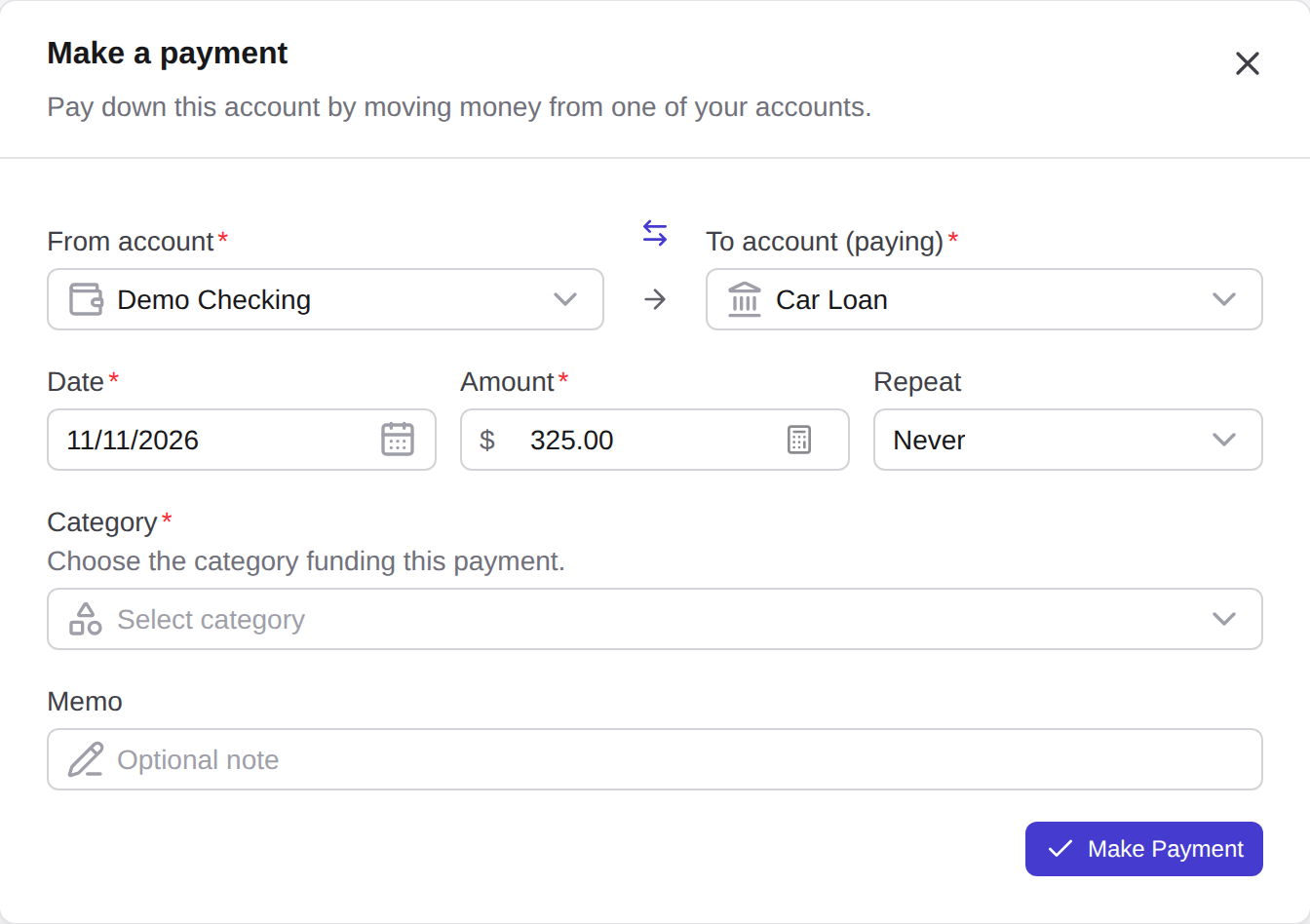
Open an account and use its main button. Most accounts show Transfer, which starts from that account. A credit card or a liability (loan) account shows Make Payment, which pays into that account. Both open the same dialog, so you can change either account once it is open.
The dialog adjusts itself to the two accounts you choose. Paying a credit card or a liability from a Cash & Bank, Asset or Investment account is titled Make a payment; every other combination — including moving a balance between two cards or between two loans — is Transfer between accounts. The Category field only appears when the pair of accounts needs one, and changing either account re-checks it.
If you picked the accounts the wrong way round, Swap accounts exchanges the From account and To account. It works as soon as either side is filled in, moving the chosen account to the empty side.
Common cases
Between checking and savings
The classic transfer. Your total money is unchanged; your net worth is unchanged. No category is involved.
Paying a credit card
Paying a card is a transfer from the account you pay with to the card account. It is not new spending — the spending happened when you used the card.
When the money comes from a Checking, Savings, Cash, Digital Wallet, Asset or Investment account, Budget Thing fills in the card's own payment category for you, so the payment uses the money already set aside for the card. See Make a Card Payment.
Paying down a loan
The same pattern: a transfer from the paying account to the loan account. This reduces what you owe and is reflected in net worth rather than counted as an expense.
A loan has no payment category of its own, so you choose the category the payment comes out of. See Loan Payments.
Moving a balance between two cards, or between two loans
A balance transfer from one credit card to another, or consolidating one loan into another, only moves debt. No money leaves your budget, so the transfer takes no category — the Category field is not shown.
Ready to pay moves with the balance
A card balance transfer also carries over Ready to pay, the money your budget already set aside for the card you are paying down, but only the part that card no longer needs. Budget Thing keeps first what the card still owes after the transfer, and moves the rest to the card that takes on the debt.
For a card that owes $5,000 and has $800 of Ready to pay:
| Amount moved to the other card | Left owed on the old card | Ready to pay that moves | Ready to pay left on the old card |
|---|---|---|---|
| $3,000 | $2,000 | $0 | $800 |
| $4,500 | $500 | $300 | $500 |
| $5,000 | $0 | $800 | $0 |
The old card never keeps more Ready to pay than it still owes, and the total Ready to pay across the two cards does not change. The transfer shows a line such as "Moved $300.00 of Ready to pay from Old Card to New Card". Only the Ready to pay as of the transfer's date counts, so changing the amount or date of the transfer, or deleting it, recalculates the move. Transfers between two loans, and between a card and a loan, don't move Ready to pay.
If you made a card balance transfer before this behavior existed, the move is applied the next time Budget Thing recalculates your budget, which happens on most edits. A card's Ready to pay can shift once when that happens.
Moving debt between a credit card and a loan
Moving a card balance onto a loan, or a loan onto a card, is still a transfer, but it changes what your budget has available, so you choose a category for it. Budget Thing does not pick one for you.
Drawing cash from a card or loan into a bank account
Taking a cash advance from a credit card, or drawing money out of a loan, into a Cash & Bank account raises the bank balance and creates new money to spend — think of the cash advance that gives you money to use now. Because it changes what your budget has available, you choose the category the borrowed money lands in, and its availability goes up. Budget Thing does not pick a category for you.
When a transfer asks for a category
| From | To | Category |
|---|---|---|
| Checking, Savings, Cash, Digital Wallet, Asset or Investment | Checking, Savings, Cash, Digital Wallet, Asset or Investment | None |
| Credit Card or Liability | Checking, Savings, Cash, Digital Wallet, Asset or Investment | Required — you choose it |
| Checking, Savings, Cash, Digital Wallet, Asset or Investment | Credit Card | The card's payment category, filled in automatically |
| Checking, Savings, Cash, Digital Wallet, Asset or Investment | Liability | Required — you choose it |
| Credit Card | Credit Card | None |
| Liability | Liability | None |
| Credit Card | Liability | Required — you choose it |
| Liability | Credit Card | Required — you choose it |
The direction matters: paying a card from checking is a payment, while drawing cash from a card into checking is a cash advance that requires a category because it creates new money to spend.
Moving money into savings does not decide what the money is for. That is what categories and assignments on the Categories screen are for.
Editing and reconciling transfers
Transfers have their own editing behavior because a change has to stay consistent on both sides. And, as with any transaction, once a transfer is reconciled its account, amount, date and destination are locked until the latest reconciliation is undone — and that applies if either side has been reconciled. See Edit or Delete a Transaction.